

I have seen lots of good quality AARs lately (including my AARs), and I've seen even more comments on people wondering "How did you do that?" and "I'd never be able to do that!". Well, now you can try!
Requirements:
So, let's get started!
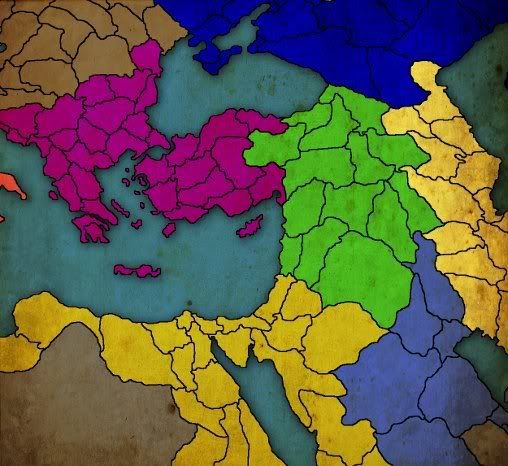
First we need a map background. Monnikje has made a great work converting the provinces.bmp file of Europa Universalis III into empty maps, that means less work for us. I decided to take this tutorial's picture from my Byzantine game.

Next thing we're going to do, we will paint the map's provinces to match the game's situation.

Then we will improve the water parts of the map. Select the wand tool and shift-click on the water regions. Don't forget the smaller parts, in this case the Bosphorus strait.
Right-click on the area(s) you selected and choose Layer from copy. Make sure the new layer is selected in the layer panel before proceeding.
Then go to Filter->Artistic->Underpainting. You can experiment with the settings and styles, but I personally like underpainting and with these settings:

(Texture coverage is on maximum).
Hit OK.
Now we're going to use the "old paper" picture found in the requirements list. Drag the picture to Photoshop. If it opens it as a new project in a new tab (instead of adding it to the existing one), hit ctrl-A, copy and paste it to the project we're making now.
Hit ctrl-T to scale the paper image (make sure the layer is selected!!!) so that it covers to whole image. Then go to the layer tab, where you choose "Multiply" from the drop-down list. By default it's "Normal".

It is now like "beneath" the layers. Isn't it beautiful?

It's already looking like a map, but now let's add texts to indicate the nation names. I like the font Charlemagne Std, but you can use whatever you want.
If you want, you can select the custom shape tool and find a compass shape. Then choose a colour and add it to the image.
Finally, let's tell what this map is by making a box and adding some text:

There it is. Part II with some heavier and harder manipulation coming later. Beware: The second part needs more experience than this.
I added the .psd project in a zip as an attachment, if you want to take a look.
Requirements:
- Adobe Photoshop CS4
- Monnikje's Blank Worldmaps found here. If you use IN for some reason (MMP2, for example), here's a similar one for IN
- "Old Map" picture we're going to use in this tutorial, here. Right-click and save it.
- Able to find the tools mentioned
- Patience
So, let's get started!
First we need a map background. Monnikje has made a great work converting the provinces.bmp file of Europa Universalis III into empty maps, that means less work for us. I decided to take this tutorial's picture from my Byzantine game.
Next thing we're going to do, we will paint the map's provinces to match the game's situation.
Then we will improve the water parts of the map. Select the wand tool and shift-click on the water regions. Don't forget the smaller parts, in this case the Bosphorus strait.
Right-click on the area(s) you selected and choose Layer from copy. Make sure the new layer is selected in the layer panel before proceeding.
Then go to Filter->Artistic->Underpainting. You can experiment with the settings and styles, but I personally like underpainting and with these settings:
(Texture coverage is on maximum).
Hit OK.
Now we're going to use the "old paper" picture found in the requirements list. Drag the picture to Photoshop. If it opens it as a new project in a new tab (instead of adding it to the existing one), hit ctrl-A, copy and paste it to the project we're making now.
Hit ctrl-T to scale the paper image (make sure the layer is selected!!!) so that it covers to whole image. Then go to the layer tab, where you choose "Multiply" from the drop-down list. By default it's "Normal".
It is now like "beneath" the layers. Isn't it beautiful?
It's already looking like a map, but now let's add texts to indicate the nation names. I like the font Charlemagne Std, but you can use whatever you want.
If you want, you can select the custom shape tool and find a compass shape. Then choose a colour and add it to the image.
Finally, let's tell what this map is by making a box and adding some text:
There it is. Part II with some heavier and harder manipulation coming later. Beware: The second part needs more experience than this.
I added the .psd project in a zip as an attachment, if you want to take a look.
Attachments
- 1